project / active
PaneKeeper
Multi-monitor window layouts for Windows 10 and 11: every window back where it belongs, with one shortcut.
problem
With several monitors, windows end up in the wrong place after docking a laptop or a restart, and arranging the browser, editor and chat every morning takes time. I wanted to do it with one shortcut.
what it is
Window layouts in one shortcut
PaneKeeper saves the position, size and monitor of your windows as a named layout and restores the whole layout with one shortcut. Dock your laptop, press Ctrl+Alt+1, and everything is back. Version 0.2.0, for Windows 10 and 11: open source (MIT), free.
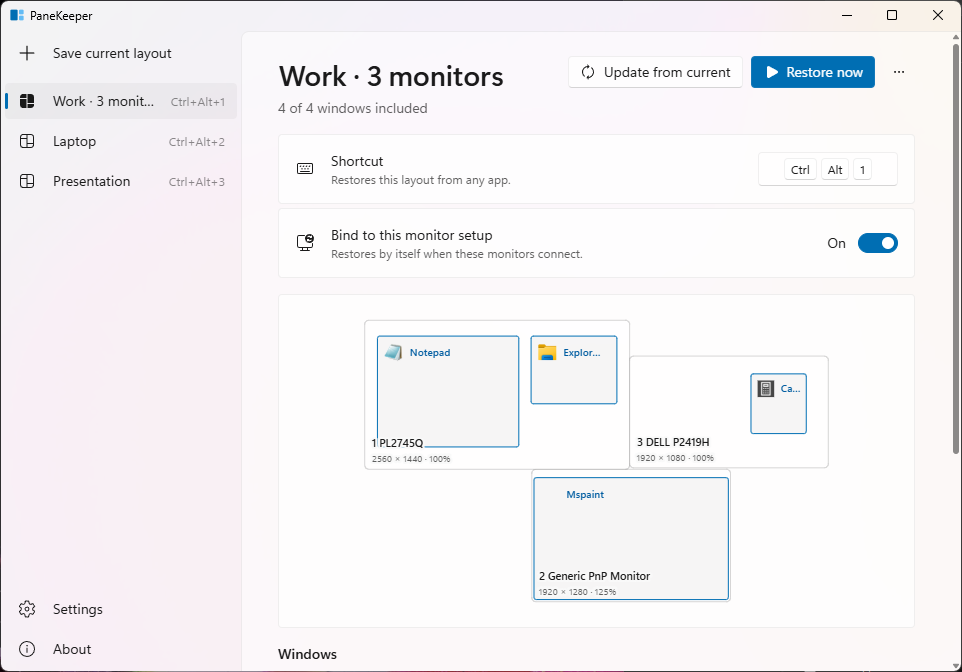
- Named layouts, such as "Work · 3 monitors" or "Laptop". The first gets Ctrl+Alt+1, the second Ctrl+Alt+2, and you can pick your own.
- Launch missing apps: switch it on for a window, and PaneKeeper starts the app, waits for its window and places it. Nothing is started without that.
- Monitor map shows your monitors to scale in their real arrangement, and the window list picks what a layout includes.
- Auto-restore: a layout bound to a monitor setup comes back by itself when those monitors connect (a Settings option).
- Tray: save a layout, pause, and start with Windows without opening the app window.
Missing monitor
Each window remembers its monitor by device id, not by its number in Display settings, and positions are DPI aware. A monitor that isn't connected is drawn dashed on the map, and its windows are mapped proportionally onto the primary monitor, never off-screen.
What's new in 0.2
- A new Windows 11 interface, shared with Clickloom, FolderPilot and Netlume: your layouts in the side navigation, Mica, light and dark themes, Fluent icons, messages in the window instead of pop-ups, and a new app icon.
- Polish and English in the window, tray menu, messages and errors. It follows the Windows display language; switch it in Settings and the choice is kept.
- Settings and About: start with Windows, language, theme, auto-restore, pause shortcuts, the wait for launched apps and open the data folder; version and project links.
- Undo a deleted layout from the message that follows, and the restore result says how many windows came back, how many apps aren't running and how many windows are blocked.
- Upgrading from 0.1: your layouts carry over; saving, restoring, shortcuts and monitor handling work as before. The installer carries the full licence texts of everything it ships.
How it works
The app is built with Tauri 2 and Rust and places windows through Win32. It runs in user mode: it only reads and changes the position and size of windows, never closes them, injects no code, and never asks for administrator rights. Layouts are a JSON file in %APPDATA%\PaneKeeper. No account, no network access, no telemetry.
Limits
Windows doesn't let a normal app move windows of apps running as administrator; they show as blocked after a restore unless PaneKeeper runs as administrator too. Some apps (Store apps, some games and installers) restrict moving. Virtual desktops aren't supported.
Tell me what breaks
Bug reports, ideas and pull requests are all welcome: issues on GitHub.
how it is built
- Windows in the wrong place after docking, a restart, every morning
- Tauri 2 + Rust a light Windows tray app
- Win32 window placement monitor by device id, DPI aware
- Local JSON no account, network or telemetry
- A layout in one shortcut open source, MIT licence
release register
-
0.2.0
New interface and two languages
A Windows 11 look with layouts in the side navigation, light and dark themes, Polish and English, and undo when deleting a layout.
-
0.1.0
First release
Multi-monitor window layouts, restore by shortcut or from the tray, a monitor map, launching missing apps and auto-restore.