project / active
Netlume
A free, simple per-app network monitor and bandwidth limiter for Windows 10 and 11.
problem
NetLimiter works, but its interface is unfriendly and it costs money after the trial. Netlume is meant to be a free, simple alternative: a limit for one app takes a few seconds to set.
what it is
Which app is using the connection
Netlume shows every app that uses the network, live: its download and upload rate and its total for the current session. It runs on Windows 10 and 11.
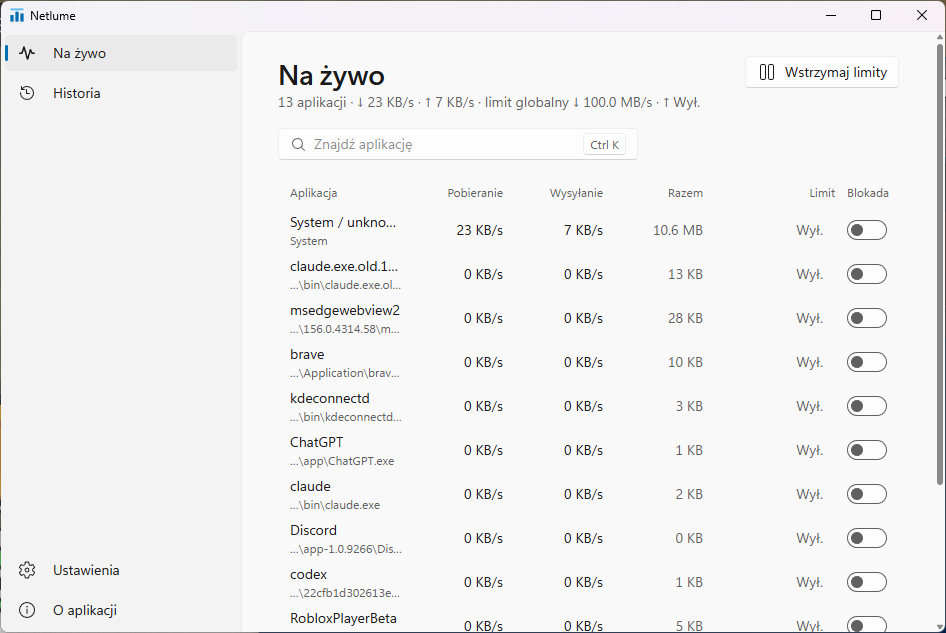
- Limits on download and upload for one app, or one global limit for the whole PC.
- Block cuts an app off the network in one click.
- Pause lifts every limit and block at once, from the Live page, Settings or the tray; they come back on restart.
- History keeps daily download and upload totals for each app.
- Settings: start with Windows, language (Polish or English), theme (system, light, dark), global limit and data folder.
- Tray and autostart: closing the window keeps it in the tray, and starting with Windows doesn't ask for elevation every time.
What's new in 0.2
- A new interface in the Windows 11 style: Mica background, side navigation, settings in cards, light and dark theme.
- Polish and English across the app and the tray menu; the chosen language is remembered.
- Settings and About pages instead of scattered switches.
- A new icon — bars under a limit line — in the window, the tray and About.
How it works
The app is built with Tauri 2 and Rust. Traffic goes through WinDivert, a signed driver under the LGPL: Netlume attributes packets to apps and delays the ones over the limit (a token bucket). In a test, a 1 MB/s limit measured 0.97 MB/s. Rules and history are plain JSON files in %APPDATA%\Netlume.
Before you install
Netlume needs administrator rights, because it filters traffic through a driver. Microsoft Defender may flag WinDivert as unwanted software. It's a known false positive shared by WinDivert-based tools, and it has been reported to Microsoft. If Defender quarantines WinDivert.dll or WinDivert64.sys, restore them and allow them in Windows Security.
Tell me what breaks
Netlume is young, so there will be bugs. Bug reports, ideas and pull requests are all welcome: issues on GitHub.
how it is built
- NetLimiter: unfriendly and paid it works, but costs money after the trial
- Tauri 2 + Rust a light app with a tray icon
- WinDivert a signed driver (LGPL) intercepts every app's packets
- Token bucket packets over the limit wait; a 1 MB/s limit measures 0.97 MB/s
- JSON files rules and daily history in %APPDATA%\Netlume
- A free per-app limiter open source, MIT licence
release register
-
0.2.1
Tray in Polish and English
Tray menu in the app's language, a new icon, a working language switch.
-
0.2.0
New interface
A Windows 11 look: Mica, side navigation, light and dark theme, Polish and English, Settings and About pages.
-
0.1.0
First release
Live traffic, limits, block, pause, history, tray and autostart.