project / active
FolderPilot
An automatic file organiser for Windows: rules move and rename new files, with preview and undo, and nothing deleted.
problem
Downloads, the desktop and photo folders don't tidy themselves. I wanted a tool that moves and names files by my rules, but never deletes anything and lets me undo every move.
what it is
Rules instead of tidying
FolderPilot watches the folders you pick and moves or renames new files by your rules. It runs from the tray, without admin rights. Version 0.2.0, for Windows: open source (MIT), free.
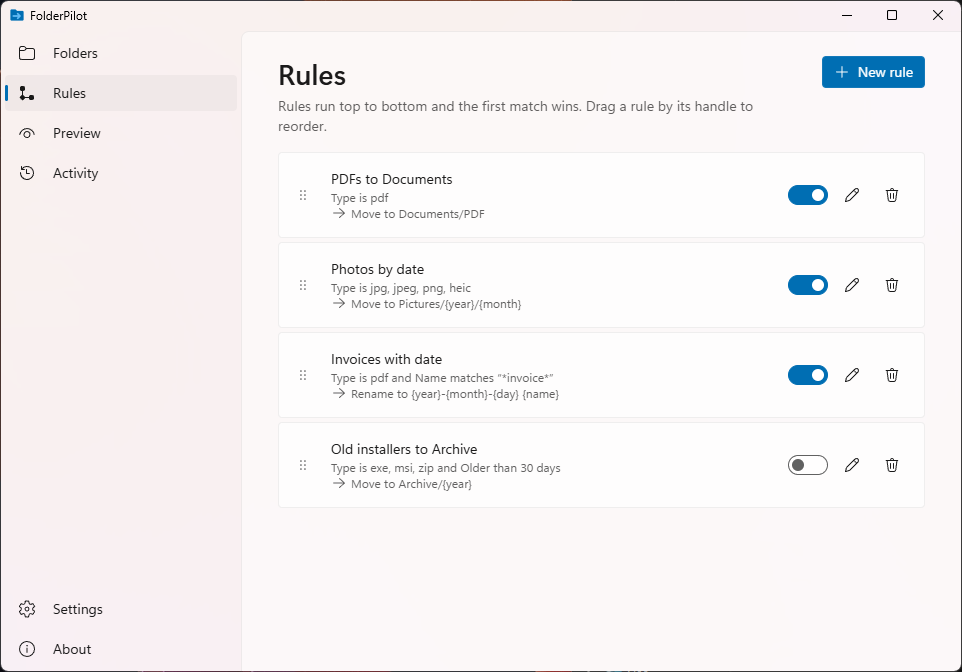
- A rule reads as a sentence: when a file in these folders matches, move it or rename it. Conditions are file type, name pattern, age and size. Rules run top to bottom and the first match wins.
- Starters: PDFs to Documents, photos by the date they were taken (EXIF), the date in front of the name, and an archive for files older than 90 days.
- Templates
{name}{year}{month}{day}{counter}build the path and name, and the editor shows an example as you type. - Preview: a new rule starts switched off, and Preview shows every planned move before anything happens.
- Activity and Undo: every move is logged, and a whole run is undone with one button.
- Pause everything from the tray, or just one folder.
Safe by design
FolderPilot never deletes and never overwrites. A name that is taken gets " (2)". When moving to another drive, the file is copied, checked, and only then removed from where it was. Downloads in progress (.crdownload, .part, .tmp) are skipped, and a new file waits until it stops changing. Undo skips a file that has changed or gone since it was moved.
What's new in 0.2
- A new Windows 11 interface, shared with Clickloom and Netlume: side navigation, Mica, light and dark themes, Fluent icons, messages in the window instead of pop-ups, and a new app icon.
- Polish and English in the window, tray menu, rule descriptions, starter rules and errors. It follows the Windows display language; switch it in Settings and the choice is kept.
- Settings and About: start with Windows, language, theme, pause all folders and open the data folder; version, project page, source, issues and licence.
- Undo removal of a rule or watched folder from the message that follows.
- Upgrading from 0.1: your rules and history carry over; watching, moves and undo work as before. The installer carries the full licence texts of everything it ships.
How it works
The app is built with Tauri 2 and Rust. Windows reports folder changes live, and age-based rules are checked by a pass at startup and every hour. Rules and the journal are JSON files in %APPDATA%\FolderPilot. The installer is per user, with no admin prompt.
Tell me what breaks
Bug reports, rule ideas and pull requests are all welcome: issues on GitHub.
how it is built
- Messy folders Downloads, desktop, undated photos
- Tauri 2 + Rust a light Windows tray app
- Folder watching live changes + a periodic pass for old files
- Move journal every move logged, undo a whole run
- Order without risk nothing deleted or overwritten
release register
-
0.2.0
New interface and two languages
A Windows 11 look, light and dark themes, Polish and English, and undo when removing a rule or watched folder.
-
0.1.0
First release
Watched folders, rules, preview, a move journal and undo per run.